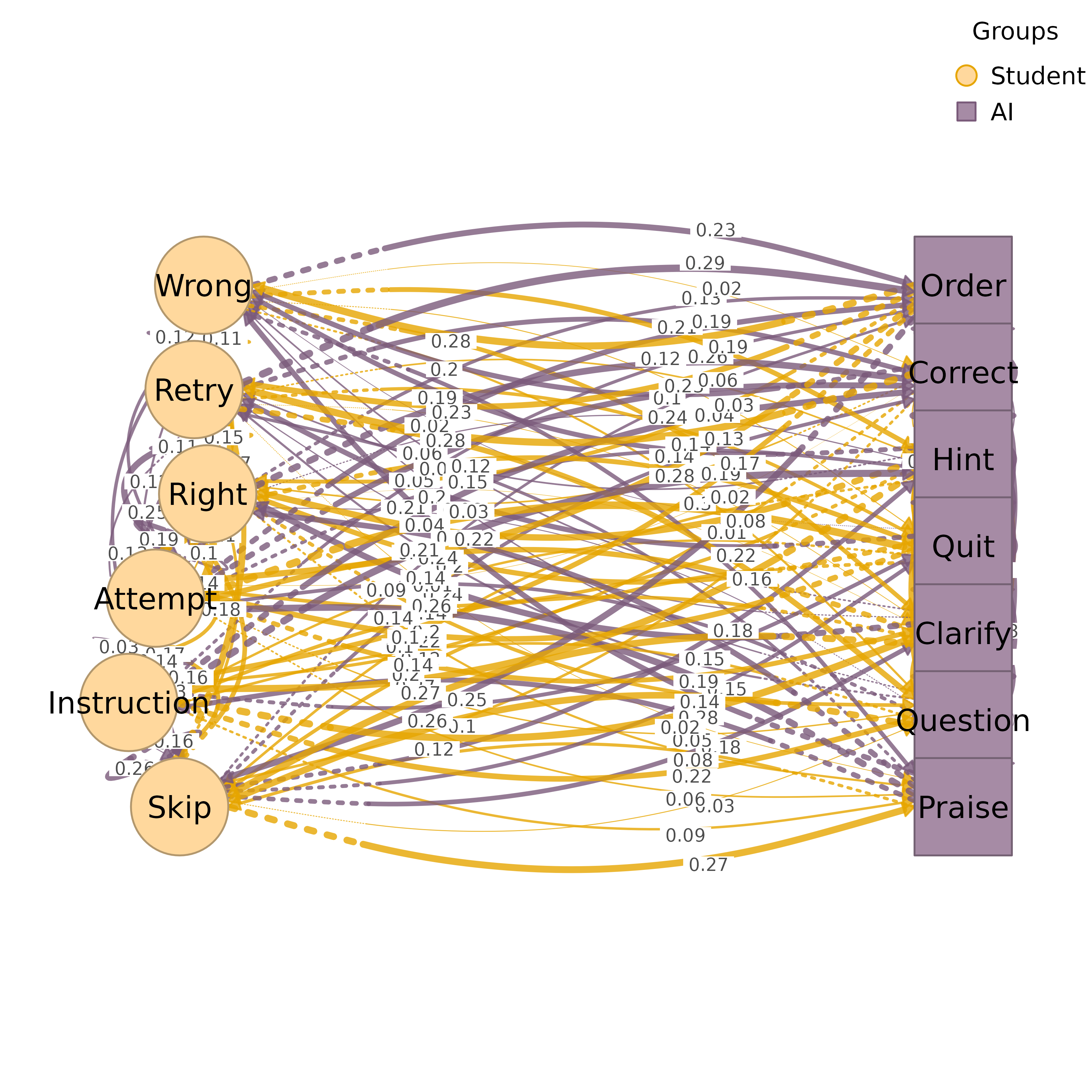
Plots a TNA model with nodes arranged in groups by a geometric layout. The
circular layout (the default for layout = "auto") places each group
on an arc of a circle. The bipartite layout places exactly two groups in
two columns, two rows, or facing arrangements. The polygon layout places
three or more groups along the sides of a regular polygon with one side
per group.
Usage
plot_htna(
  x,
  node_list = NULL,
  community = NULL,
  layout = "auto",
  use_list_order = TRUE,
  jitter = FALSE,
  jitter_amount = 0.8,
  jitter_side = "first",
  orientation = "vertical",
  group1_pos = -2,
  group2_pos = 2,
  group_spacing = NULL,
  node_spacing = NULL,
  columns = 1,
  column_spacing = NULL,
  layout_margin = 0.15,
  curvature = 0.4,
  group1_color = "#4FC3F7",
  group2_color = "#fbb550",
  group1_shape = "circle",
  group2_shape = "square",
  group_colors = NULL,
  group_shapes = NULL,
  angle_spacing = 0.15,
  edge_colors = NULL,
  intra_curvature = NULL,
  legend = TRUE,
  legend_position = "bottom",
  legend_horiz = NULL,
  legend_ncol = NULL,
  legend_size = 0.8,
  extend_lines = FALSE,
  scale = 1,
  nodes = NULL,
  label_abbrev = NULL,
  ...
)

htna(
  x,
  node_list = NULL,
  community = NULL,
  layout = "auto",
  use_list_order = TRUE,
  jitter = FALSE,
  jitter_amount = 0.8,
  jitter_side = "first",
  orientation = "vertical",
  group1_pos = -2,
  group2_pos = 2,
  group_spacing = NULL,
  node_spacing = NULL,
  columns = 1,
  column_spacing = NULL,
  layout_margin = 0.15,
  curvature = 0.4,
  group1_color = "#4FC3F7",
  group2_color = "#fbb550",
  group1_shape = "circle",
  group2_shape = "square",
  group_colors = NULL,
  group_shapes = NULL,
  angle_spacing = 0.15,
  edge_colors = NULL,
  intra_curvature = NULL,
  legend = TRUE,
  legend_position = "bottom",
  legend_horiz = NULL,
  legend_ncol = NULL,
  legend_size = 0.8,
  extend_lines = FALSE,
  scale = 1,
  nodes = NULL,
  label_abbrev = NULL,
  ...
)
Arguments
- x
A tna object, weight matrix, or cograph_network.
- node_list
Node groups can be specified as:
A list of character vectors (node names per group)
A column name of the node table of a
cograph_network(e.g.,"groups")NULL, in which case the first node-table column namedgroups,group,clusters,cluster,community,moduleorlayeris used, with a message
Groups must not overlap, every name must be a node of
x, and at least two groups are required.- community
Community detection method to use for auto-grouping. If specified, overrides
node_list. Seedetect_communitiesfor available methods: "louvain", "walktrap", "fast_greedy", "label_prop", "infomap", "leiden".- layout
Layout type:
"auto"(default, the circular layout),"bipartite"(exactly two groups),"polygon"(three or more groups), or"circular". The values"triangle","rectangle","pentagon"and"hexagon"are aliases for"polygon".- use_list_order
Logical. Use node_list order (TRUE) or weight-based order (FALSE). Only applies to the bipartite layout with
orientation = "vertical".- jitter
Controls horizontal spread of nodes. Options:
FALSE (default) or 0: No jitter (nodes aligned in columns)
TRUE: Auto-compute jitter based on edge connectivity
Numeric (0-1): Amount of jitter (0.3 = spread nodes 30\
Named list: Manual per-node offsets by label (e.g., list(Wrong = -0.2))
Only applies to the bipartite layout with
orientationset to"vertical"or"horizontal".- jitter_amount
Base jitter amount when jitter=TRUE. Default 0.8. Higher values spread nodes more toward the center. Only applies to bipartite layout.
- jitter_side
Which side(s) to apply jitter: "first" (or "left"), "second" (or "right"), "both", or "none". Default "first" (only first group nodes are jittered toward center). Only applies to bipartite layout.
- orientation
Layout orientation for bipartite: "vertical" (two columns, default), "horizontal" (two rows), "facing" (both groups on same horizontal line, group1 left, group2 right, tip-to-tip), or "circular" (two facing semicircles with a gap between them). Ignored for non-bipartite layouts.
- group1_pos
Position of the first group in the bipartite layout, an x position for vertical and a y position for horizontal orientation. Overridden by
group_spacingif specified.- group2_pos
Position of the second group in the bipartite layout. Overridden by
group_spacingif specified.- group_spacing
Numeric. Distance between the two groups in bipartite layout. Overrides
group1_pos/group2_pos. For example,group_spacing = 6places groups at x = -3 and x = 3. Default NULL (uses group1_pos/group2_pos).- node_spacing
Numeric. Vertical (or horizontal) gap between nodes within a group. Default NULL (computed from the largest number of rows in a group). Increase for more space between nodes (e.g., 0.5 or 0.8).
- columns
Integer or vector of length 2. Number of sub-columns per group. A single value applies to both groups. A vector of 2 sets columns per group independently (e.g.,
c(2, 1)puts the first group in 2 columns). Nodes are distributed evenly across sub-columns. Default 1.- column_spacing
Numeric. Horizontal distance between sub-columns within a group. Default NULL (auto:
node_spacing * 2).- layout_margin
Margin around the layout (0-1). Default 0.15. Increase if labels or self-loops are clipped at the edges.
- curvature
Edge curvature amount.
- group1_color
Color for first group nodes.
- group2_color
Color for second group nodes.
- group1_shape
Shape for first group nodes.
- group2_shape
Shape for second group nodes.
- group_colors
Vector of colors for each group. Overrides group1_color/group2_color. If NULL, two-group layouts use group1_color/group2_color and 3+ group layouts cycle through a built-in palette of 12 colors. The length must equal the number of groups.
- group_shapes
Vector of shapes for each group. Overrides group1_shape/group2_shape. If NULL, two-group layouts use group1_shape/group2_shape and 3+ group layouts cycle through a built-in palette of 8 shapes. The length must equal the number of groups.
- angle_spacing
Controls empty space at corners (0-1). Default 0.15. Higher values create larger gaps in polygon and circular layouts. For circular auto layout, the default is increased to 0.35 unless explicitly set.
- edge_colors
Vector of colors for edges by source group. If NULL (default), uses darker versions of group_colors. Set to FALSE to use the default edge color.
- intra_curvature
Numeric. Curvature amount for intra-group edges (edges between nodes in the same group). When set, intra-group edges are removed from the main plot and added separately as curves that arc away from the opposing group. Default NULL (intra-group edges are plotted by splot).
- legend
Logical. Whether to show a legend of the groups.
- legend_position
Position for legend: "topright", "topleft", "bottomright", "bottomleft", "right", "left", "top", "bottom". Side positions place the legend in a reserved margin band, and corner positions place it inside the plot region.
- legend_horiz
Logical. Force horizontal (TRUE) or vertical (FALSE) legend. NULL (default) auto-selects: horizontal for "top"/"bottom" positions, vertical otherwise.
- legend_ncol
Integer. Number of columns when the legend is vertical. NULL (default) lets
graphics::legendpick. Ignored when the legend is horizontal.- legend_size
Legend text size (
cex), as insplot(). The legend symbols are sized from it, and it is divided bysqrt(scale). A value that is not a single positive number raises an error of classcograph_bad_legend_size.- extend_lines
Logical or numeric. Add extension lines from nodes. Only applies to bipartite layout.
FALSE (default): No extension lines
TRUE: Lines extending toward the other group (length 0.1)
Numeric: Length of extension lines
- scale
Scaling factor for high-resolution output (e.g., scale = 4 for 300 dpi). The legend text and symbols are divided by
sqrt(scale), and the extension lines are plotted with line width1 / sqrt(scale). The node positions do not depend onscale, because the layout is normalized after it is computed.- nodes
Node metadata.
NULL(default) uses the node table of acograph_network. A data frame replaces it, with one row per node in node order. Display labels are taken from itslabelscolumn, or from itslabelcolumn whenlabelsis absent.- label_abbrev
Label abbreviation: NULL (none), integer (max chars), or "auto" (adaptive based on node count). See
abbrev_label.- ...
Additional parameters passed to
tplot().
Value
Invisibly, the cograph_network object returned by
tplot(). The function is called for its plot.