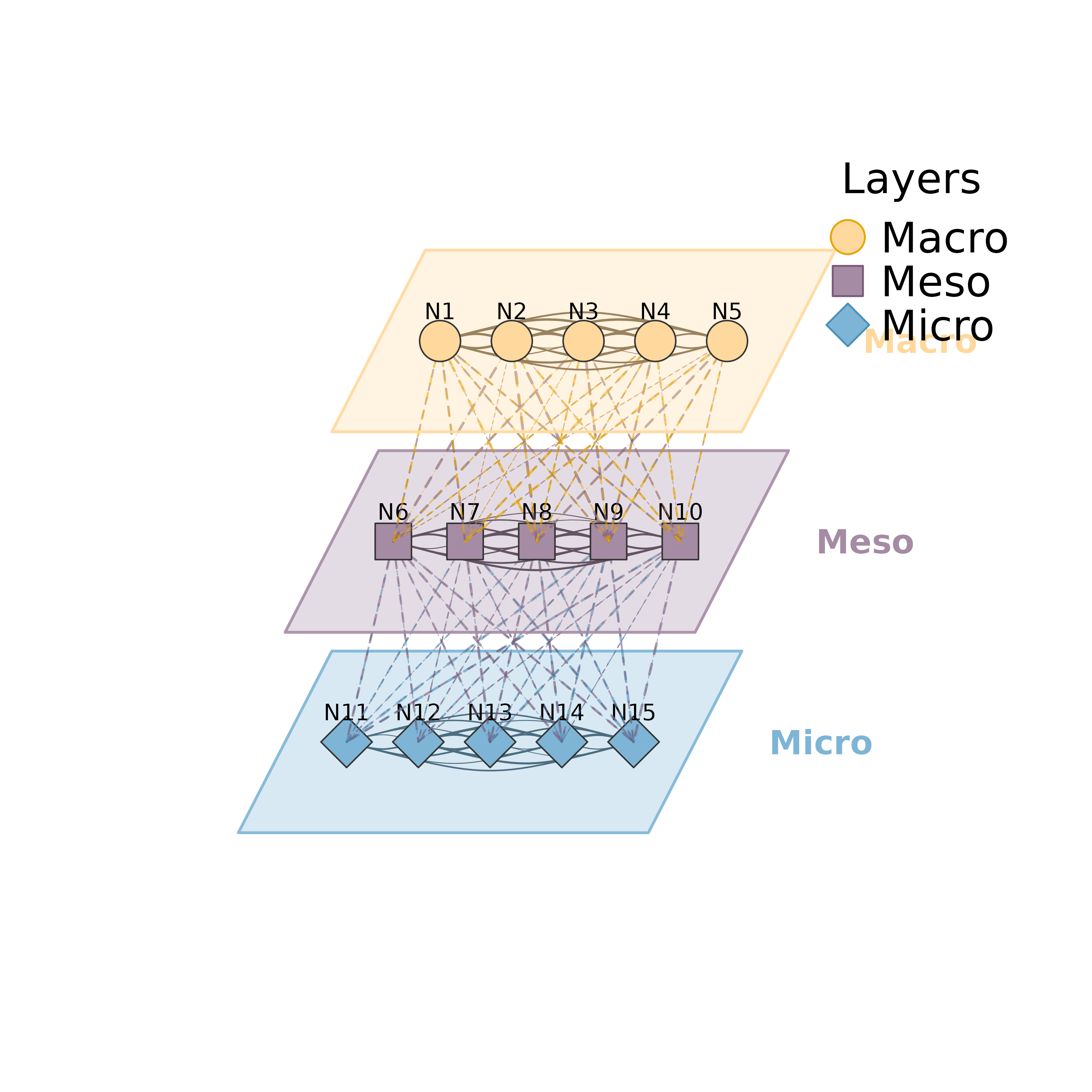
Plots a multilevel network as a stack of layers in a pseudo-3D perspective
view. Each layer is enclosed in a parallelogram shell. Edges within a layer
are plotted as solid curved arrows, and edges between adjacent layers are
plotted as straight lines in the style set by between_style.
Usage
plot_mlna(
  model,
  layer_list = NULL,
  community = NULL,
  layout = "horizontal",
  layer_spacing = 4,
  layer_width = 8,
  layer_depth = 4,
  skew_angle = 25,
  node_spacing = 0.7,
  colors = NULL,
  shapes = NULL,
  edge_colors = NULL,
  within_edges = TRUE,
  between_edges = TRUE,
  between_style = 2,
  show_border = TRUE,
  legend = TRUE,
  legend_position = "topright",
  curvature = 0.15,
  node_size = 3,
  minimum = 0,
  scale = 1,
  show_labels = TRUE,
  nodes = NULL,
  label_abbrev = NULL,
  ...
)

mlna(
  model,
  layer_list = NULL,
  community = NULL,
  layout = "horizontal",
  layer_spacing = 4,
  layer_width = 8,
  layer_depth = 4,
  skew_angle = 25,
  node_spacing = 0.7,
  colors = NULL,
  shapes = NULL,
  edge_colors = NULL,
  within_edges = TRUE,
  between_edges = TRUE,
  between_style = 2,
  show_border = TRUE,
  legend = TRUE,
  legend_position = "topright",
  curvature = 0.15,
  node_size = 3,
  minimum = 0,
  scale = 1,
  show_labels = TRUE,
  nodes = NULL,
  label_abbrev = NULL,
  ...
)
Arguments
- model
A tna object, weight matrix, or cograph_network.
- layer_list
Layer assignment of the nodes. One of
a named list of character vectors with the node names of each layer; at least two non-overlapping layers are required;
a single string naming a column of the node data (e.g., "layer");
NULL, in which case the first node-data column found among "layer", "layers", "level", "levels", "groups", "group", "clusters" and "cluster" is used.
- community
Community detection method used to form the layers. When given, it overrides
layer_list. Passed todetect_communities, which accepts "louvain", "walktrap", "fast_greedy", "label_prop", "infomap" and "leiden". An error is raised when fewer than two communities are found.- layout
Node layout within layers. "horizontal" (default) places nodes on a horizontal line, "circle" arranges them in an ellipse, and "spring" uses force-directed placement based on within-layer edges.
- layer_spacing
Vertical distance between layer centers. Default 4.
- layer_width
Horizontal width of each layer shell. Default 8.
- layer_depth
Depth of each layer shell in the perspective view. Default 4.
- skew_angle
Angle of perspective skew in degrees. Default 25.
- node_spacing
Proportion of the layer width (0-1) over which nodes are spread. Higher values place nodes closer to the layer edges. Default 0.7.
- colors
Vector of fill colors, one per layer. NULL (default) uses a built-in palette.
- shapes
Vector of node shapes, one per layer. Supported values are "circle", "square", "diamond" and "triangle"; other values are plotted as circles. NULL (default) assigns "circle", "square", "diamond" and "triangle" to the first four layers.
- edge_colors
Vector of colors for between-layer edges, indexed by the source layer. NULL (default) uses a built-in palette. Within-layer edges use a darkened version of the layer color.
- within_edges
Logical. Plot edges within layers. Default TRUE.
- between_edges
Logical. Plot edges between adjacent layers. Default TRUE.
- between_style
Line type of between-layer edges. Default 2 (dashed). Use 1 for solid, 3 for dotted.
- show_border
Logical. Plot the parallelogram shells around layers. Default TRUE.
- legend
Logical. Show the layer legend. Default TRUE.
- legend_position
Position of the legend. Default "topright".
- curvature
Curvature of within-layer edges. Default 0.15.
- node_size
Size of nodes. Default 3.
- minimum
Edge weight threshold. Edges whose weight does not exceed this value are not plotted. Default 0.
- scale
Scaling factor for high-resolution output (e.g., scale = 4 for 300 dpi). Node sizes, line widths and text sizes are divided by
sqrt(scale). Default 1.- show_labels
Logical. Show node labels. Default TRUE.
- nodes
Node metadata. NULL (default) uses the node data of a cograph_network. A data frame replaces it and must have one row per node in the node order of
model. Display text is taken from itslabelscolumn if present, otherwise from itslabelcolumn.- label_abbrev
Label abbreviation: NULL (none), integer (max chars), or "auto" (adaptive based on node count).
- ...
Additional parameters (currently unused).