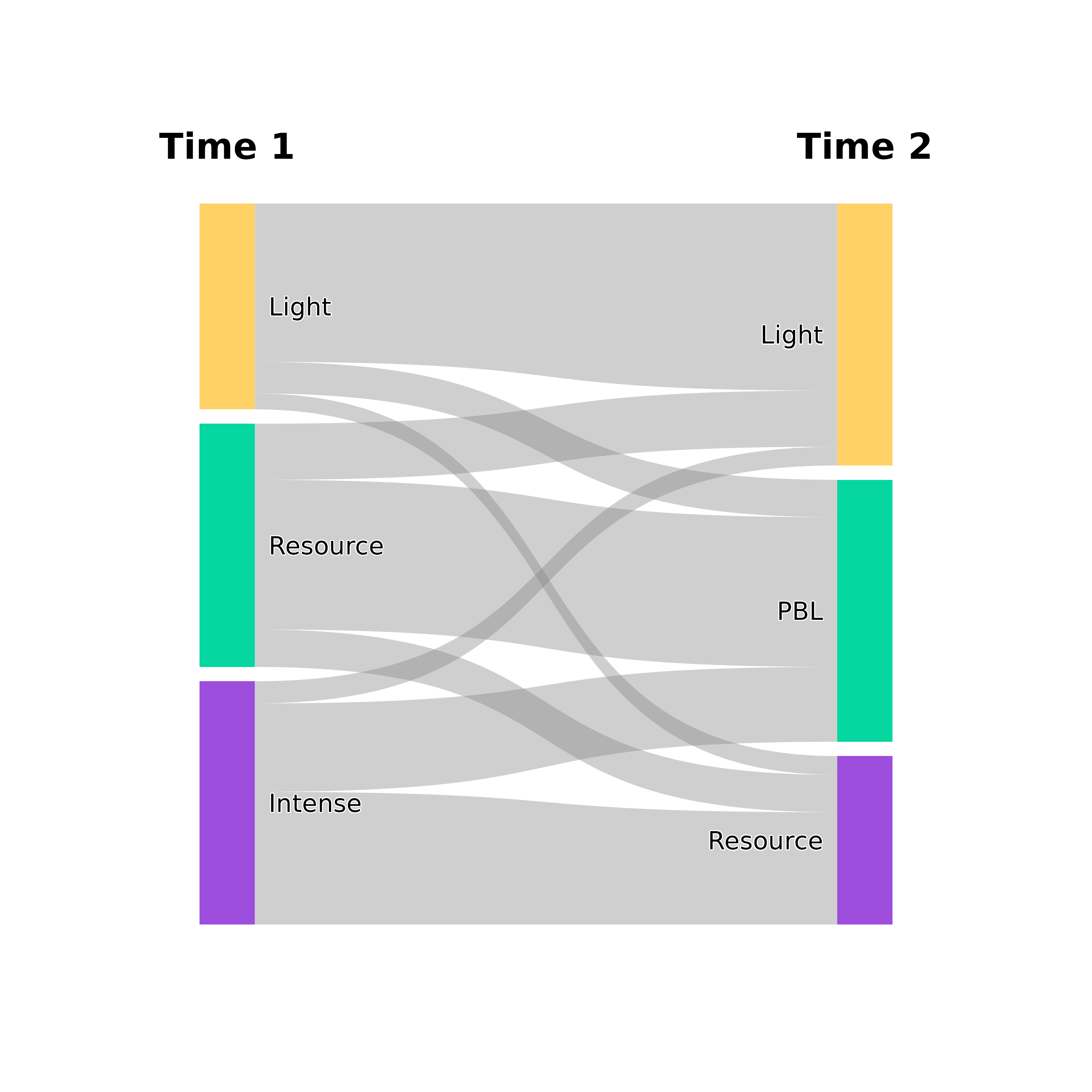
Creates an alluvial (Sankey) diagram of how items flow from one set of
categories to another, for example cluster membership changes or state
changes between time points. Aggregated flows are plotted as ribbons whose
width is proportional to the transition count. With
track_individuals = TRUE, each row of a data frame is plotted as a
separate line.
Usage
plot_transitions(
  x,
  from_title = "From",
  to_title = "To",
  title = NULL,
  from_colors = NULL,
  to_colors = NULL,
  flow_fill = "#888888",
  flow_alpha = 0.4,
  flow_color_by = NULL,
  flow_border = NA,
  flow_border_width = 0.5,
  node_width = 0.08,
  node_border = NA,
  node_spacing = 0.02,
  label_size = 3.5,
  label_position = c("beside", "inside", "above", "below", "outside"),
  mid_label_position = NULL,
  label_halo = TRUE,
  label_color = "black",
  label_fontface = "plain",
  label_nudge = 0.02,
  title_size = 5,
  title_color = "black",
  title_fontface = "bold",
  curve_strength = 0.6,
  show_values = FALSE,
  value_position = c("center", "origin", "destination", "outside_origin",
    "outside_destination"),
  value_size = 3,
  value_color = "black",
  value_halo = NULL,
  value_fontface = "bold",
  value_nudge = 0.03,
  value_min = 0,
  show_totals = FALSE,
  total_size = 4,
  total_color = "white",
  total_fontface = "bold",
  conserve_flow = TRUE,
  min_flow = 0,
  threshold = 0,
  value_digits = 2,
  column_gap = 1,
  track_individuals = FALSE,
  line_alpha = 0.3,
  line_width = 0.5,
  jitter_amount = 0.8,
  proportional_nodes = TRUE,
  node_label_format = NULL,
  bundle_size = NULL,
  bundle_legend = TRUE,
  bundle_legend_size = 3,
  bundle_legend_color = "grey50",
  bundle_legend_fontface = "italic",
  bundle_legend_position = c("bottom", "top")
)
Arguments
- x
Input data in one of these formats:
A transition matrix (rows = from, columns = to, values = counts).
A vector of "before" states, with the vector of "after" states passed as the second argument (
from_title). Both vectors must have the same length, greater than 2, and their contingency table is computed.A data frame with two columns of raw observations, whose contingency table is computed.
A data frame with three or more columns of raw observations, one column per time point, plotted as a multi-step diagram.
A data frame with columns
from,toandcount.A list of matrices for multi-step transitions.
A
tnaobject. Its sequence data are used as a data frame of time points (rows with missing values are dropped), or its weight matrix when no sequence data are stored.
- from_title
Title for the left column. Default "From". For multi-step and individual-tracking plots, a vector with one title per column. Data frame input then uses the column names by default, and a vector shorter than the number of columns is replaced by "T1", "T2", ...
- to_title
Title for the right column. Default "To". Ignored for multi-step plots.
- title
Optional plot title.
- from_colors
Colors for the left-side nodes. In multi-step and individual-tracking plots, the colors of all states. Default NULL uses the built-in palette.
- to_colors
Colors for the right-side nodes in two-column plots. Default NULL uses the built-in palette.
- flow_fill
Fill color for flows. Default "#888888" (grey). In multi-step plots it is replaced by the state colors when
flow_color_byis set. Individual-tracking lines do not use it.- flow_alpha
Alpha transparency for flows. Default 0.4.
- flow_color_by
Color flows by state. Multi-step aggregate plots accept
"source"or"destination". Individual-tracking plots also accept"first"and"last". Default NULL usesflow_fill. Two-column aggregate plots ignore this argument.- flow_border
Border color for flows. Default NA (no border).
- flow_border_width
Line width for flow borders. Default 0.5.
- node_width
Width of node rectangles (0-1 scale). Default 0.08.
- node_border
Border color for nodes. Default NA (no border).
- node_spacing
Vertical spacing between nodes (0-1 scale). Default 0.02.
- label_size
Size of node labels. Default 3.5.
- label_position
Position of node labels: "beside" (default), "inside", "above", "below", "outside". In multi-step and individual-tracking plots, "beside" and "outside" label the first and last columns only. See
mid_label_positionfor middle columns.- mid_label_position
Position of labels for intermediate (middle) columns in individual-tracking plots. Same options as
label_position. Default NULL useslabel_position.- label_halo
Logical: add a white halo around labels and column titles? Default TRUE.
- label_color
Color of state name labels. Default "black". Applied to multi-step and individual-tracking plots. Two-column aggregate plots use black external labels and white inside labels.
- label_fontface
Font face of state name labels ("plain", "bold", "italic", "bold.italic"). Default "plain". Applied to multi-step and individual-tracking plots.
- label_nudge
Distance between node edge and label (in plot units). Default 0.02. Used by multi-step and individual-tracking plots.
- title_size
Size of column titles. Default 5.
- title_color
Color of column title text. Default "black". Applied to multi-step and individual-tracking plots.
- title_fontface
Font face of column titles. Default "bold". Applied to multi-step and individual-tracking plots.
- curve_strength
Controls bezier curve shape (0-1). Default 0.6.
- show_values
Logical: show transition counts on flows? Default FALSE.
- value_position
Position of flow values: "center", "origin", "destination", "outside_origin", "outside_destination". Default "center". Individual-tracking plots use "center", "origin" and "destination".
- value_size
Size of value labels on flows. Default 3.
- value_color
Color of value labels. Default "black".
- value_halo
Logical: add halo around flow value labels? Default NULL uses
label_halo. Applied to multi-step and individual-tracking plots.- value_fontface
Font face of flow value labels. Default "bold". Applied to multi-step and individual-tracking plots.
- value_nudge
Distance of value labels from node edge when using "origin" or "destination" positions. Default 0.03.
- value_min
Minimum count to show a flow value label in multi-step and individual-tracking plots. Default 0 (show all). Two-column aggregate plots show every nonzero value label when
show_values = TRUE.- show_totals
Logical: show total counts on nodes? Default FALSE.
- total_size
Size of total labels. Default 4.
- total_color
Color of total labels. Default "white".
- total_fontface
Font face of total labels. Default "bold". Applied to multi-step and individual-tracking plots.
- conserve_flow
Logical. When TRUE (default), node heights on both sides of a two-column plot are proportions of the same total flow. When FALSE, each side is scaled to its own total. Ignored for multi-step and individual-tracking plots.
- min_flow
Minimum flow value to display in aggregate plots. Default 0 (show all).
- threshold
Minimum flow value to display in aggregate plots. Flows below
max(threshold, min_flow)are removed. Default 0.- value_digits
Number of decimal places for flow value labels and node totals. Default 2.
- column_gap
Horizontal spread of columns (0-1) for multi-step and individual-tracking plots. Default 1 uses the full width. Smaller values (e.g., 0.6) bring the columns closer together.
- track_individuals
Logical: plot individual lines instead of aggregated flows? Default FALSE. When TRUE and
xis a data frame of raw observations, each row becomes a separate line.- line_alpha
Alpha for individual tracking lines. Default 0.3. When bundling is active, values up to 0.3 are raised to 0.9 and larger values are increased by 0.3, capped at 1.
- line_width
Width of individual tracking lines. Default 0.5. When bundling is active, widths range from
line_widthto twice that value according to the number of cases per line.- jitter_amount
Currently unused. Lines are spaced evenly within each node. Default 0.8.
- proportional_nodes
Logical: size nodes proportionally to counts in individual-tracking plots? When FALSE, all states in a column have equal height. Default TRUE.
- node_label_format
Format string for node labels with
{state}and{count}placeholders in individual-tracking plots, for example"{state} (n={count})". Default NULL (plain state name).- bundle_size
Controls line bundling for large datasets in individual-tracking plots. Default NULL (no bundling). A value of 1 or more sets the number of cases each line represents. A value in (0, 1) sets the fraction of the original number of lines to keep (e.g., 0.15 keeps about 15 percent). Paths with fewer than half the cases of one line are dropped.
- bundle_legend
Logical or character: show an annotation when bundling is active? Default TRUE shows "Each line ~ N cases". A string is used as custom text, with
{n}as the placeholder for the number of cases.- bundle_legend_size
Size of the bundle legend text. Default 3.
- bundle_legend_color
Color of the bundle legend text. Default "grey50".
- bundle_legend_fontface
Font face of the bundle legend text. Default "italic".
- bundle_legend_position
Position of the bundle legend: "bottom" (default) or "top".