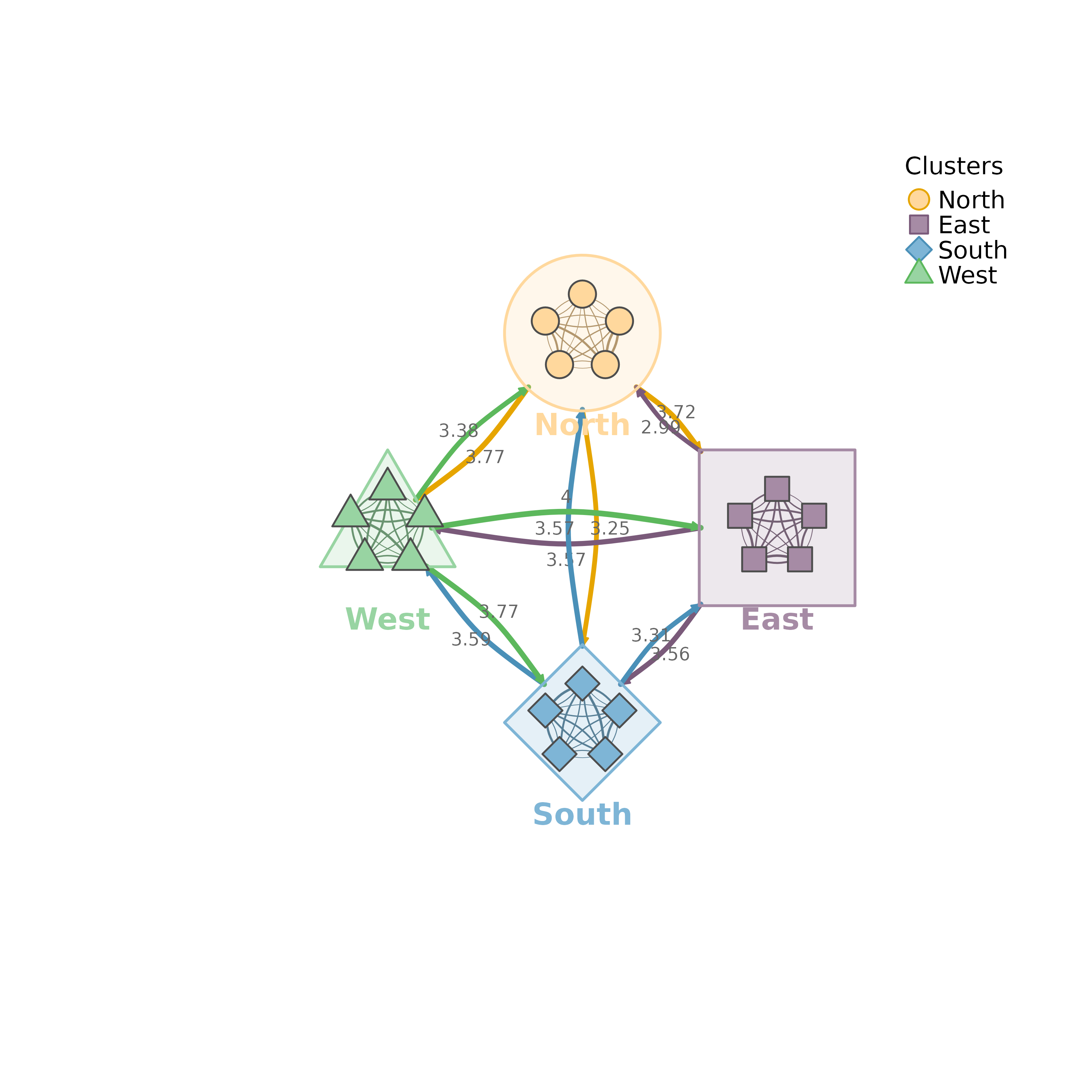
Plots a network whose nodes are grouped into clusters. Each cluster is plotted as a shell shape containing its nodes. By default, edges between clusters are aggregated into summary edges and edges within clusters are plotted individually.
Usage
plot_mtna(
  x,
  cluster_list = NULL,
  community = NULL,
  layout = "circle",
  spacing = 4,
  shape_size = 1.8,
  node_spacing = 0.5,
  colors = NULL,
  shapes = NULL,
  edge_colors = NULL,
  bundle_edges = TRUE,
  bundle_strength = 0.8,
  summary_edges = TRUE,
  aggregation = c("sum", "mean", "max", "min", "median", "density"),
  within_edges = TRUE,
  show_border = TRUE,
  legend = TRUE,
  legend_position = "topright",
  curvature = 0.3,
  node_size = 3,
  layout_margin = 0.15,
  scale = 1,
  show_labels = FALSE,
  nodes = NULL,
  label_size = NULL,
  label_abbrev = NULL,
  cluster_shape = NULL,
  ...
)

mtna(
  x,
  cluster_list = NULL,
  community = NULL,
  layout = "circle",
  spacing = 4,
  shape_size = 1.8,
  node_spacing = 0.5,
  colors = NULL,
  shapes = NULL,
  edge_colors = NULL,
  bundle_edges = TRUE,
  bundle_strength = 0.8,
  summary_edges = TRUE,
  aggregation = c("sum", "mean", "max", "min", "median", "density"),
  within_edges = TRUE,
  show_border = TRUE,
  legend = TRUE,
  legend_position = "topright",
  curvature = 0.3,
  node_size = 3,
  layout_margin = 0.15,
  scale = 1,
  show_labels = FALSE,
  nodes = NULL,
  label_size = NULL,
  label_abbrev = NULL,
  cluster_shape = NULL,
  ...
)
Arguments
- x
A tna object, weight matrix, or cograph_network.
- cluster_list
Cluster assignment of the nodes. One of
a named list of character vectors with the node names of each cluster; at least two non-overlapping clusters are required;
a single string naming a column of the node data (e.g., "groups");
NULL, in which case the first node-data column found among "clusters", "cluster", "groups", "group", "community" and "module" is used.
- community
Community detection method used to form the clusters. When given, it overrides
cluster_list. Seedetect_communitiesfor available methods.- layout
How to arrange the clusters: "circle" (default), "grid", "horizontal", "vertical".
- spacing
Distance between cluster centers. Default 4.
- shape_size
Size of each cluster shape (shell radius). Default 1.8.
- node_spacing
Radius for node placement within shapes in summary mode, as a proportion (0-1) of
shape_size. Default 0.5. Whensummary_edges = FALSE, nodes are placed at radiusshape_size.- colors
Vector of colors for each cluster. NULL (default) uses a built-in palette.
- shapes
Vector of shapes for each cluster. Defaults cycle through "circle", "square", "diamond", "triangle", "pentagon", "hexagon", "star", and "cross". In summary mode, shells other than circle, square, diamond and triangle are plotted as circles.
- edge_colors
Vector of edge colors by source cluster. NULL (default) uses a built-in palette.
- bundle_edges
Logical. Order the nodes around each shell by the direction of the clusters they connect to, so that edges toward the same cluster leave from neighbouring nodes. Used when
summary_edges = FALSE. Default TRUE.- bundle_strength
Currently unused.
- summary_edges
Logical. Show aggregated summary edges between clusters instead of individual node edges. Default TRUE.
- aggregation
Method for aggregating edge weights between clusters: "sum" (total flow), "mean" (average strength), "max" (strongest link), "min" (weakest link), "median", or "density" (normalized by possible edges). Default "sum". Only used when summary_edges = TRUE.
- within_edges
Logical. When summary_edges is TRUE, also show individual edges within each cluster. Default TRUE.
- show_border
Logical. When
summary_edges = FALSE, plot a dashed circle around each cluster. Default TRUE.- legend
Logical. Whether to show legend. Default TRUE.
- legend_position
Position for legend. Default "topright".
- curvature
Edge curvature. Default 0.3.
- node_size
Size of nodes inside shapes (summary mode). Default 3.
- layout_margin
Margin around the layout as fraction of range (summary mode). Default 0.15.
- scale
Scaling factor for high-resolution output. Values greater than 1 reduce node, edge, label, and legend sizes by
sqrt(scale)while leaving cluster spacing and shape_size unchanged. Default 1.- show_labels
Logical. Show node labels inside clusters (summary mode). Default FALSE.
- nodes
Node metadata. NULL (default) uses the node data of a cograph_network. A data frame replaces it and must have one row per node in the node order of
x. In summary mode, display text is taken from itslabelscolumn if present, otherwise from itslabelcolumn.- label_size
Label text size (summary mode). Default NULL (auto-scaled).
- label_abbrev
Label abbreviation in summary mode: NULL (none), integer (max chars), or "auto" (adaptive based on node count).
- cluster_shape
Accepted for compatibility; currently unused. Use
shapesto control cluster shell shapes.- ...
When
summary_edges = FALSE, additional parameters passed toplot_tna(). In summary mode, onlyedge.lwd,edge.labels,edge.label.cexandminimumare read.
Value
Invisibly returns a cluster_summary object when
summary_edges = TRUE, and otherwise the
plot_tna() result (a cograph_network object).
See plot_mtna.